
Sanyhore Fully Automatic Hinge Assembly Machine: Troubleshooting Error Codes

2025-12-04


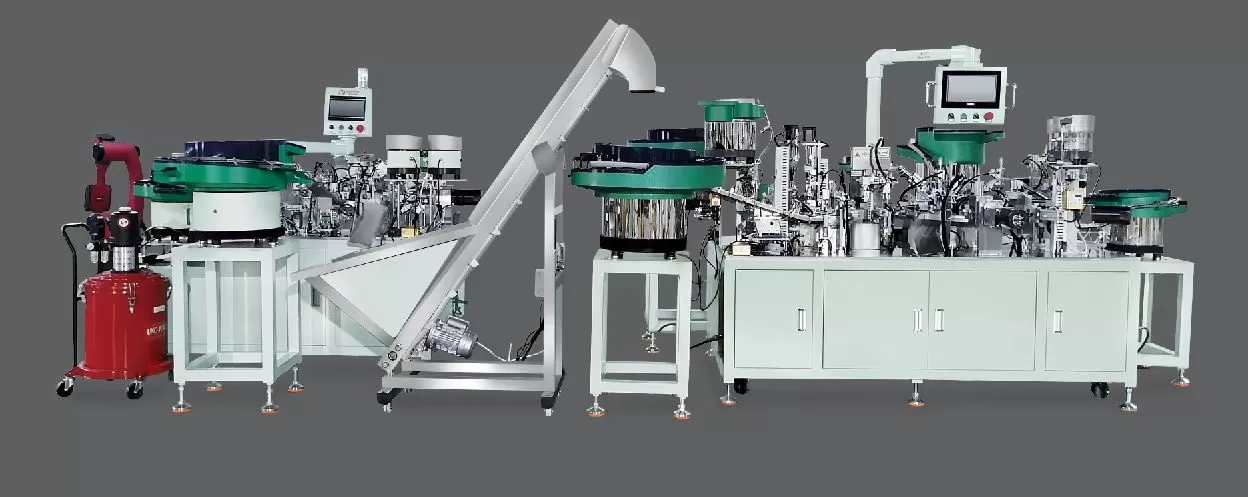
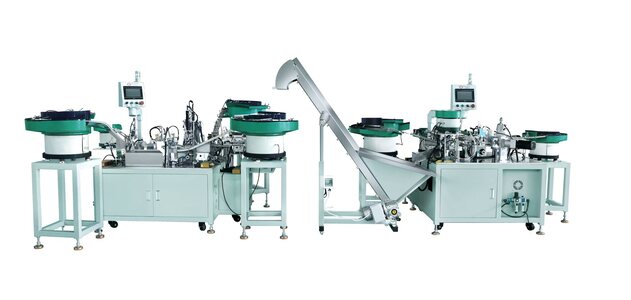
Sanyhore’s fully automatic hinge assembly machine is designed to enhance production efficiency in furniture and hardware manufacturing. However, like any automated system, it may encounter error codes during operation. These codes act as critical indicators of underlying issues, from minor misalignments to component malfunctions. This guide breaks down common error codes, their root causes, and step-by-step solutions to help you maintain seamless operation of your Sanyhore hinge assembly machine.

1. Common Error Codes and Troubleshooting Steps

Sanyhore’s automatic hinge assembly machine typically displays error codes on its control panel, such as E1, E2, or E3. Below are the most frequently encountered codes, along with their symptoms, causes, and fixes:

- Error Code E1: Component Misalignment

*Symptoms*: Unusual grinding sounds, uneven hinge placement, or failed assembly of hinge components.

*Causes*: Misaligned conveyor tracks, loose guide rails, or incorrectly positioned tooling fixtures.

*Solution*: Power off the machine and inspect the conveyor system. Use a precision ruler to check track alignment; adjust bolts to ensure components run parallel. Verify tooling fixtures are securely clamped and aligned with the assembly path. Re-energize the machine and run a test cycle to confirm alignment.

- Error Code E2: Sensor Failure

*Symptoms*: Machine halts mid-operation, with the control panel showing “Sensor Error” or a blank display.

*Causes*: Dust or debris blocking the sensor lens, loose wiring, or a faulty proximity sensor.

*Solution*: Turn off the machine and disconnect power. Gently clean the sensor lens with compressed air to remove dust. Check wiring connections for frays or loose terminals; re-seat or replace damaged cables. If the issue persists, test the sensor with a multimeter to confirm functionality—replace if it fails to respond to component proximity.

- Error Code E3: Hydraulic Pressure Drop

*Symptoms*: Weak pressing force, slow component insertion, or the machine pausing with a “Pressure Low” alert.

*Causes*: Low hydraulic fluid level, clogged filters, or a malfunctioning pump.

*Solution*: Check the hydraulic reservoir; add fluid to the recommended level if low. Inspect and clean the pressure filter to remove debris. If fluid levels are correct, listen for unusual noises from the pump—if humming or grinding occurs, the pump may need professional service.

2. General Troubleshooting Principles for Hinge Assembly Machines

When facing error codes, follow this structured approach to diagnose issues efficiently:

- Step 1: Document the Error Code

Note the code displayed and any additional symptoms (e.g., sounds, smoke, or component damage). This helps narrow down potential causes.

- Step 2: Check Recent Changes

Review if the error occurred after a maintenance task, material change, or environmental shift (e.g., voltage fluctuations). Small adjustments like material thickness can sometimes trigger unexpected codes.

- Step 3: Inspect Critical Components

Focus on moving parts (conveyors, sensors, hydraulic lines) and fasteners. Loose screws or worn parts often cause misalignments or sensor failures.

- Step 4: Test and Validate

After implementing fixes, run a short production cycle to confirm the error has been resolved. If the issue recurs, repeat the process or consult technical support.

3. Preventive Maintenance to Minimize Errors

Proactive care reduces the frequency of error codes and extends machine lifespan. For your Sanyhore automatic hinge assembly machine:

- Daily Checks: Clean sensor lenses, lubricate moving parts (e.g., guide rails, pivot points), and inspect hydraulic fluid levels.

- Weekly Maintenance: Tighten loose fasteners, check conveyor belt tension, and verify all safety interlocks function correctly.

- Monthly Deep Clean: Disassemble accessible components to remove dust, metal shavings, or debris that could jam mechanisms.

- Software Updates: Regularly update the machine’s control system firmware to ensure compatibility with new production requirements.

4. Contact Sanyhore for Expert Support

Sanyhore is a leading manufacturer of automatic hinge assembly machines, telescopic drawer slide assembly machines, and roll forming machines. Our team of certified technicians has extensive experience resolving complex error code issues for hinge assembly systems.

If you encounter persistent errors or need personalized troubleshooting guidance, reach out to our support team:

- Phone: +86 13425506550

- Email: info@sanyhore.com

We’re committed to ensuring your production runs smoothly. Trust Sanyhore for reliable machines and expert after-sales support.

TDK:

标题:Sanyhore Automatic Hinge Assembly Machine Error Code Troubleshooting Guide

关键词:Sanyhore, hinge assembly machine error codes, automatic hinge troubleshooting, telescopic drawer slide machine, roll forming machine maintenance

描述:Sanyhore's automatic hinge assembly machine troubleshooting guide for error codes. Resolve common issues and maintain optimal performance. Contact our team today!

We use cookie to improve your online experience. By continuing to browse this website, you agree to our use of cookie.

Cookies

Please read our Terms and Conditions and this Policy before accessing or using our Services. If you cannot agree with this Policy or the Terms and Conditions, please do not access or use our Services. If you are located in a jurisdiction outside the European Economic Area, by using our Services, you accept the Terms and Conditions and accept our privacy practices described in this Policy.
We may modify this Policy at any time, without prior notice, and changes may apply to any Personal Information we already hold about you, as well as any new Personal Information collected after the Policy is modified. If we make changes, we will notify you by revising the date at the top of this Policy. We will provide you with advanced notice if we make any material changes to how we collect, use or disclose your Personal Information that impact your rights under this Policy. If you are located in a jurisdiction other than the European Economic Area, the United Kingdom or Switzerland (collectively “European Countries”), your continued access or use of our Services after receiving the notice of changes, constitutes your acknowledgement that you accept the updated Policy. In addition, we may provide you with real time disclosures or additional information about the Personal Information handling practices of specific parts of our Services. Such notices may supplement this Policy or provide you with additional choices about how we process your Personal Information.


Cookies

Cookies are small text files stored on your device when you access most Websites on the internet or open certain emails. Among other things, Cookies allow a Website to recognize your device and remember if you've been to the Website before. Examples of information collected by Cookies include your browser type and the address of the Website from which you arrived at our Website as well as IP address and clickstream behavior (that is the pages you view and the links you click).We use the term cookie to refer to Cookies and technologies that perform a similar function to Cookies (e.g., tags, pixels, web beacons, etc.). Cookies can be read by the originating Website on each subsequent visit and by any other Website that recognizes the cookie. The Website uses Cookies in order to make the Website easier to use, to support a better user experience, including the provision of information and functionality to you, as well as to provide us with information about how the Website is used so that we can make sure it is as up to date, relevant, and error free as we can. Cookies on the Website We use Cookies to personalize your experience when you visit the Site, uniquely identify your computer for security purposes, and enable us and our third-party service providers to serve ads on our behalf across the internet.

We classify Cookies in the following categories:
 ●  Strictly Necessary Cookies
 ●  Performance Cookies
 ●  Functional Cookies
 ●  Targeting Cookies


Cookie List
A cookie is a small piece of data (text file) that a website – when visited by a user – asks your browser to store on your device in order to remember information about you, such as your language preference or login information. Those cookies are set by us and called first-party cookies. We also use third-party cookies – which are cookies from a domain different than the domain of the website you are visiting – for our advertising and marketing efforts. More specifically, we use cookies and other tracking technologies for the following purposes:

Strictly Necessary Cookies
These cookies are necessary for the website to function and cannot be switched off in our systems. They are usually only set in response to actions made by you which amount to a request for services, such as setting your privacy preferences, logging in or filling in forms. You can set your browser to block or alert you about these cookies, but some parts of the site will not then work. These cookies do not store any personally identifiable information.

Functional Cookies
These cookies enable the website to provide enhanced functionality and personalisation. They may be set by us or by third party providers whose services we have added to our pages. If you do not allow these cookies then some or all of these services may not function properly.

Performance Cookies
These cookies allow us to count visits and traffic sources so we can measure and improve the performance of our site. They help us to know which pages are the most and least popular and see how visitors move around the site. All information these cookies collect is aggregated and therefore anonymous. If you do not allow these cookies we will not know when you have visited our site, and will not be able to monitor its performance.

Targeting Cookies
These cookies may be set through our site by our advertising partners. They may be used by those companies to build a profile of your interests and show you relevant adverts on other sites. They do not store directly personal information, but are based on uniquely identifying your browser and internet device. If you do not allow these cookies, you will experience less targeted advertising.

How To Turn Off Cookies
You can choose to restrict or block Cookies through your browser settings at any time. Please note that certain Cookies may be set as soon as you visit the Website, but you can remove them using your browser settings. However, please be aware that restricting or blocking Cookies set on the Website may impact the functionality or performance of the Website or prevent you from using certain services provided through the Website. It will also affect our ability to update the Website to cater for user preferences and improve performance. Cookies within Mobile Applications

We only use Strictly Necessary Cookies on our mobile applications. These Cookies are critical to the functionality of our applications, so if you block or delete these Cookies you may not be able to use the application. These Cookies are not shared with any other application on your mobile device. We never use the Cookies from the mobile application to store personal information about you.

If you have questions or concerns regarding any information in this Privacy Policy, please contact us by email at . You can also contact us via our customer service at our Site.